Log entry
USB Notification Light
Many years ago, I used to work at a magazines related company (hi ACP Magazines peeps!). My team at the time built a subscription system for the company, enabling customers to subscribe to their favourite magazine for the year ahead, pay monthly/yearly, etc.
It’s always good to help keep the team morale high, and to help with that, I installed a USB notification light in our pod in the office. Then, every time there was a sale the light glowed yellow like gold. Good times :)

You may want to do something similar. Read on to find out how it all works!
Behold: the Delcom 904017-B!
Matching the industrial name of the Delcom 904017-B, the light itself is also industrial in appearance. While not a beauty, it is sturdy: mine has lasted for 10+ years.
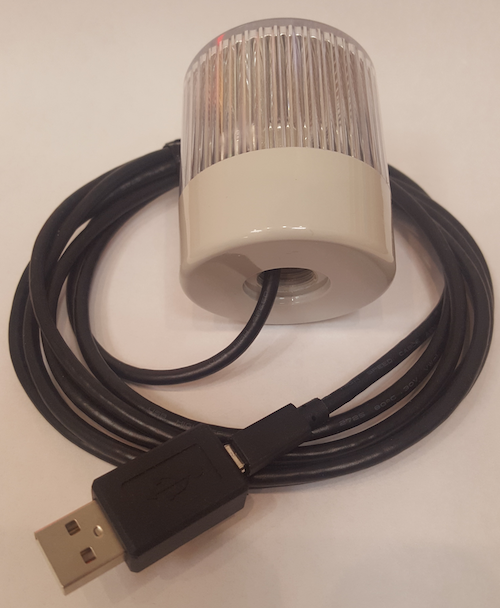
In addition to being durable, it also comes with example code showing you how to use it. I don’t know about you, but my C++ and VB.Net are a bit rusty though. Time for a more modern language
NodeJS to the rescue
The spec here describes how you can send a “direct write command” (see page 9) with the appropriate bit positions to tell the light which colour you want (see page 5). You will need to know the “vendor id” of the USB device and that is on page 13 of this spec.
The following Typescript nodeJS code uses the nodeJS “hid” library to send colour commands to the USB light.
import HID from "node-hid";


const COLOURS: Record<string, number[]> = {

   red: [101, 2, 0xfd],

   green: [101, 2, 0xfe],

   yellow: [101, 2, 0xfb],

   off: [101, 2, 0xff],

};


const color = process.argv[2];

const command = COLOURS[color];


if (!command) {

   console.error("Usage: ts-node client-tight.ts red|green|yellow|off");

   process.exit(1);

}


const deviceInfo = HID.devices().find(d => d.vendorId === 0x0fc5);

if (!deviceInfo?.path) {

   console.error("No Delcom device found");

   process.exit(1);

}


const device = new HID.HID(deviceInfo.path);

device.write(command);

device.close();
What do I use mine for these days?
I work from home these days, so for now its morale-boosting days are over. I do use it as a tool to prompt me though
- PR Prompter: a script checks Github every 15 mins and if there is a new PR from one of my team members, the light glows green
- JIRA Prompter: a script checks JIRA ITSM every 5 mins and if there is a new low-mid priority ticket for my team, the light glows yellow
- Production Dramas? Pulse (on / off) the light red
- JIRA ITSM: a script checks every 5 mins for high-priority P1 issues
- DataDog: a script checks every 5 mins for any major prod issues